Back to products

Our powerful and very safe Toshi Internal has now been released.
- Windows 10 & 11 Supported (also 25H2)
- Use our Instructions from Fix Guide
- SVM [AMD] / VT-X [INTEL] (BIOS) enabled.
- 16GB RAM (or more).
- Hyper v disabled for AMD CPU only.
- Hyper v enabled for INTEL CPU only.
- Firmware in UEFI mode only for INTEL CPU.
- The system use GPT format disk only for INTEL CPU.
Secure Boot disabled.
All Purchases are final:
- We do not issue refunds after purchase
- know what you buy - before buying!
- - Configurable Aim Key
- - Aim-Key Delay: 1–50 Ticks
- - Auto Fire
- - Five Target-Priority Modes
- - Bone Scan
- - 22 Target-Bone Choices
- - Stick To Target
- - Target Non-Visible
- - Projectile Prediction
- - Maximum Targeting Distance
- - Separate Trigger-Bot Mode
- - Optional Activation Key
- - Reaction Delay: 0–50 ms
- - Bone Scan & Target-Bone Selection
- - Radius Multiplier: 0.25–2x
- - Maximum Targeting Distance
- - Aimbot / Trigger-Bot Mode Switching
- - Smooth, Balanced & Aggressive Profiles
- - Basic Strength Control
- - Humanized Smoothing Option
- - Advanced Bezier Controls
- - Aim Speed & Assist Strength
- - Control Points & Curve Resolution
- - Random Factor & Endpoint Noise
- - Aim-Path & Assist-Point Visualizer
- - Path Colour & Fade Timing
- - Outline, Corner & Filled Boxes
- - Player Skeletons
- - Player & Tribe Names
- - Held Item & Distance
- - Carried Weight & Implant Details
- - Health Bar & Health Percentage
- - Team, Enemy & Visibility Filters
- - Display Range, Font Size & Visibility Colours
- - Draggable Preview Layout & Zoom
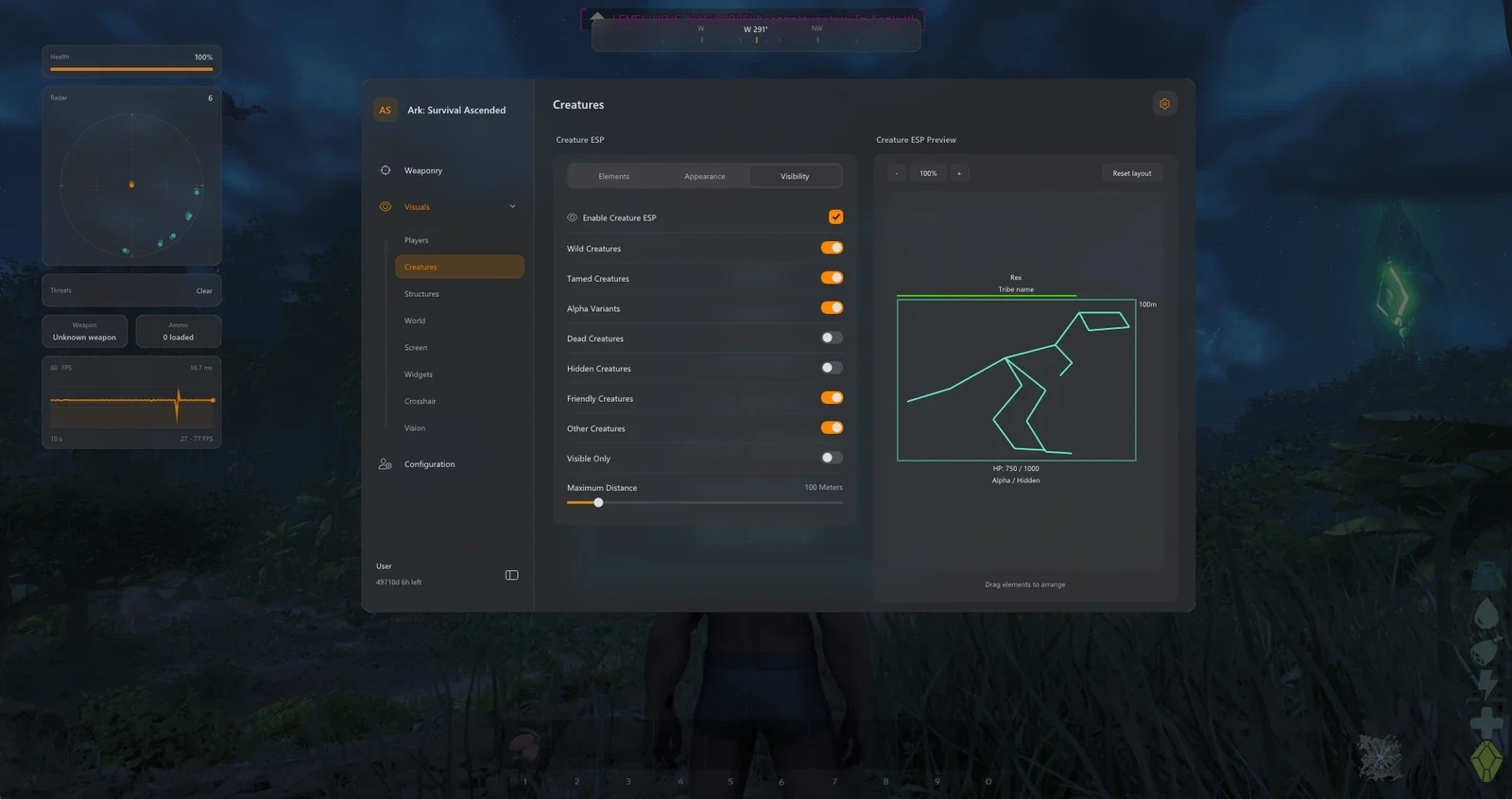
- - Creature Name, Tribe & Distance
- - Tamed on Server Indicator
- - Health Bar, Values & Percentage
- - Dead, Alpha & Hidden Labels
- - Wild, Tamed, Alpha, Dead & Hidden Filters
- - Friendly, Other & Visible-Only Filters
- - Outline, Corner & Filled Boxes
- - Creature Skeletons
- - Display Range, Font Size, Colours & Layout
- - Friendly & Other-Structure Filters
- - Turrets, Force Fields, C4 & Water Mines
- - Vaults, Fridges, Dedicated Storage & Boxes
- - Generators, Beds & Sleeping Bags
- - Tek Transmitters & Teleporters
- - Distance Labels, Display Range & Font Size
- - Stone, Metal, Crystal & Obsidian
- - Sulfur, Oil, Silica Pearls & Black Pearls
- - Element Ore, Salt, Sand & Clay
- - Trees, Cactus, Sap, Rare Flowers, Mushrooms & Berry Bushes
- - Map Teleporters, Terminals & Obelisks
- - Element Veins, Supply Drops & Explorer Notes
- - Mineral, Plant & Landmark Filter Groups
- - Individual Filters, Select All & Clear All
- - Display Range, Distance Labels & Font Size
- - FOV Circle, Radius & Colour
- - Dynamic ADS FOV
- - Top, Centre & Bottom Snaplines
- - Team, Enemy & Visibility Filters
- - Directional Compass, Radius & Marker Size
- - Off-Screen Arrows, Marker Size & Padding
- - Creature Snaplines, Compass & Off-Screen Markers
- - Radar Size, Scale & Blip Size
- - Compass Bar with Player & Team Markers
- - FPS Counter & Frame-History Graph
- - Weapon Name & Loaded Ammo
- - Health Bar & Threat Warnings
- - Widget Opacity & Layout Reset
- - Hide Trees & Hide Water
- - Camera FOV Override
- - Restore Vision Defaults
- - 10 Crosshair Presets & Live Preview
- - Crosshair Geometry & Rotation
- - Named Profiles
- - Save & Load Settings
- - Profile Selection & Paginated List
- - Delete Custom Profiles
- - Protected Default Profile
Official support
ENGINESOFT
Order support
Issues with your order?
Need help with setup, access or an order question? Reach the official ENGINESOFT community for fast support and product assistance.
Order help
Setup guidance
Updates
Join Discord
Have your order reference ready.